
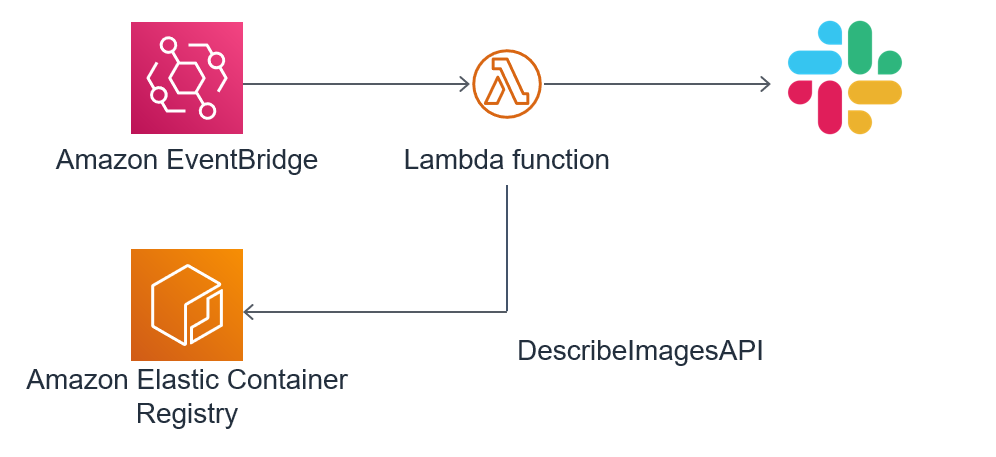
Overview
Amazon EventBridge (CloudWatch Events) detects the image scan execution and starts the Lambda function.
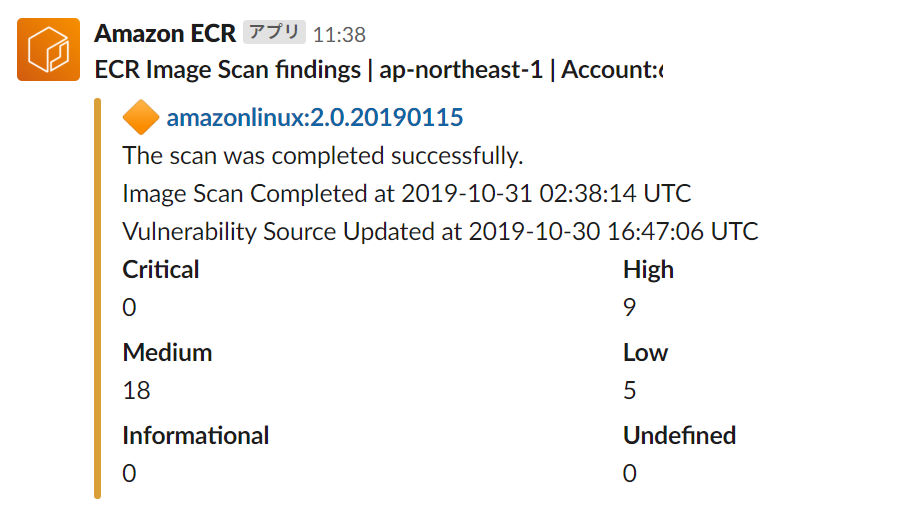
The Lambda function uses the DescribeImages API to get a summary of the scan results, formatting them and notifying Slack.
Example of notification
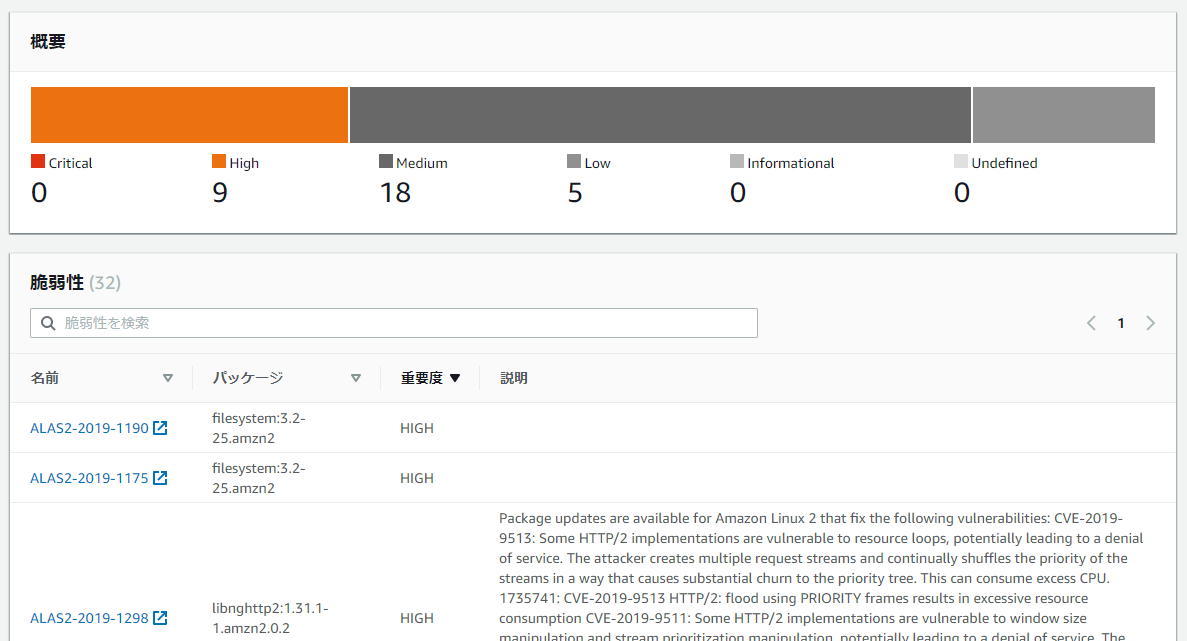
Click on an image name to go to the scan results page.
Getting Started
The source code of Lambda function is here.
https://github.com/hayao-k/ecr-image-scan-findings-to-slack/blob/master/lambda_function.py
Use python 3.7 or 3.8 for runtime.
The latest AWS SDK (boto3) is required to get a summary of the scan results.
You can include it in the function deployment package, but I recommend using Lambda Layers.
Allow ecr:DescribeImages in Lambda's execution role.
You need to set Slack's WEBHOOK_URL in the environment variable.
When the image scan is complete, the following event will be fired in the Event Bridge.
{
    "version": "0",
    "id": "85fc3613-e913-7fc4-a80c-a3753e4aa9ae",
    "detail-type": "ECR Image Scan",
    "source": "aws.ecr",
    "account": "123456789012",
    "time": "2019-10-29T02:36:48Z",
    "region": "us-east-1",
    "resources": [
        "arn:aws:ecr:us-east-1:123456789012:repository/my-repo"
    ],
    "detail": {
        "scan-status": "COMPLETE",
        "repository-name": "my-repo",
        "image-digest": "sha256:7f5b2640fe6fb4f46592dfd3410c4a79dac4f89e4782432e0378abcd1234",
        "image-tags": []
    }
}
The describe_images method retrieves a summary of the scan results.
Boto 3 Documentation ECR
https://boto3.amazonaws.com/v1/documentation/api/latest/reference/services/ecr.html#ECR.Client.describe_images
This is an example of a describe_images response.
{
    "imageDetails": [
        {
            "registryId": "123456789012",
            "repositoryName": "amazonlinux",
            "imageDigest": "sha256:7f5b2640fe6fb4f46592dfd3410c4a79dac4f89e4782432e0378abcd1234",
            "imageTags": [
                "2.0.20190115"
            ],
            "imageSizeInBytes": 61283455,
            "imagePushedAt": 1572489492.0,
            "imageScanStatus": {
                "status": "COMPLETE",
                "description": "The scan was completed successfully."
            },
            "imageScanFindingsSummary": {
                "imageScanCompletedAt": 1572489494.0,
                "vulnerabilitySourceUpdatedAt": 1572454026.0,
                "findingSeverityCounts": {
                    "HIGH": 9,
                    "LOW": 5,
                    "MEDIUM": 18
                }
            }
        }
    ]
}
To detect only scan completion events, a custom event pattern is specified in the creation of a new rule for EventBridge.
{
  "source": [
    "aws.ecr"
  ],
  "detail-type": [
    "ECR Image Scan"
  ]
}
References
Image Scanning
https://docs.aws.amazon.com/AmazonECR/latest/userguide/image-scanning.html
Events and EventBridge
https://docs.aws.amazon.com/AmazonECR/latest/userguide/ecr-eventbridge.html
Comments
Join the discussionNo comments yet. Be the first to comment.